Why webinar show-up rates are low
When a webinar has a small live audience, the usual reaction is to blame the topic, the title or the presenter. So the next one gets a new slide deck and a catchier name. Then the same thing happens again.
The live session is rarely where a webinar fails. It fails in the days between sign-up and start time. Someone registers on a Monday for a Thursday event. By Thursday they have forgotten the time, lost the link, or booked something else in that slot. Nothing reminded them. Nothing made it easy to show up.
Registration is a small decision. Showing up is a bigger one. It needs the person to remember, to block the time, and to find the link at the right moment. A good show-up system handles each of those for them.
The common causes are simple:
- The registration page is busy and unclear, so people sign up without knowing exactly what they'll get.
- The confirmation email is slow, generic, or lands in spam.
- There is no calendar invite, so the event never makes it into their day.
- There is one reminder, or none.
- The join link is hard to find when it's time to join.
- People who miss it get nothing, so the effort of registering is wasted.
Every one of these is a system gap. That's why show-up rate is a system problem, not a content problem.
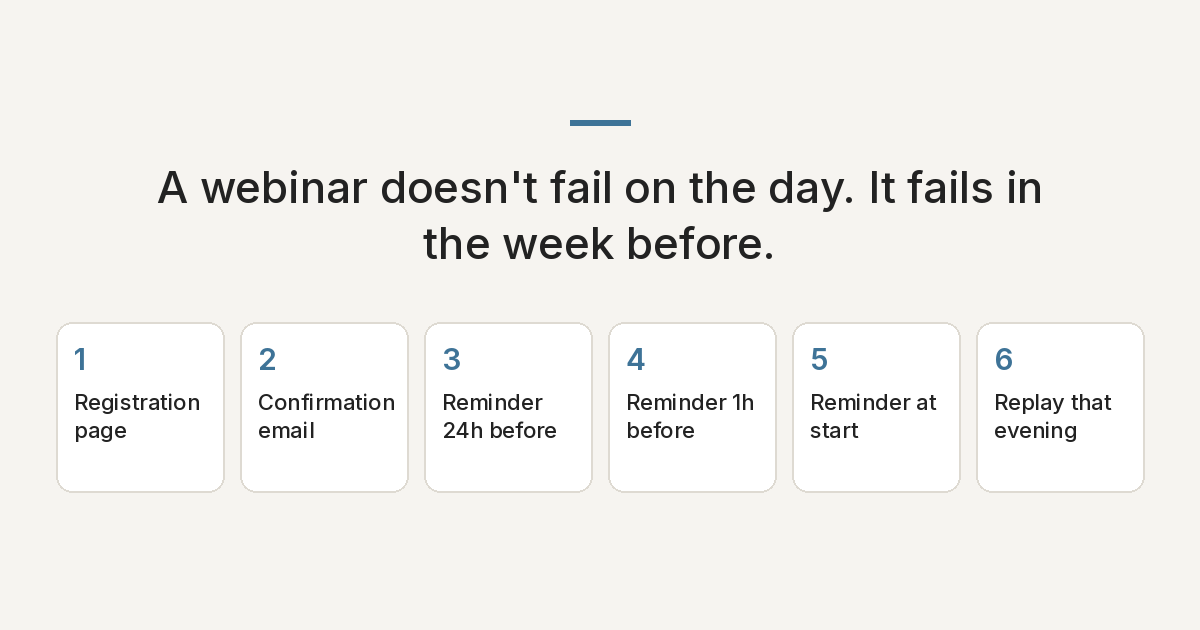
The six-step webinar show-up system
Here is a setup you can build once and reuse for every session. Each step has one job.
Step 1: Registration page with one promise and one form
The page should answer three questions fast: what will I learn, when is it, and how long does it take. Use one clear promise in the headline, the date and time with the time zone, and one short form. Name and email is usually enough.
Example headline: “In 45 minutes, learn how to [specific outcome] without [common pain]. Live on Thursday, 7 PM IST.”
Remove extra links, long bios and multiple offers. Every extra choice on the page competes with the form.
Step 2: Confirmation email right away, with a calendar link
Send it within seconds of sign-up. Confirm the date, time and time zone, repeat the promise in one line, and include “Add to Google Calendar” and “Add to Outlook/Apple” links or an .ics file. A calendar entry does more work than any reminder, because it blocks the time in their actual day.
Example wording: “You're registered for [title] on Thursday at 7 PM IST. Add it to your calendar now so it doesn't get lost: [calendar link]. Your join link will also be in your reminder emails.”
Step 3: Reminder 24 hours before
This one helps people plan. It gives them a day's notice to clear the slot. Remind them what they'll walk away with, not just that the event exists.
Example wording: “Tomorrow at 7 PM IST: [title]. We'll cover [point one] and [point two]. Here's the calendar link again if you haven't added it: [link].”
Step 4: Reminder 1 hour before
Short and practical. This catches people who planned to come but are deep in their day. Put the join link in this email so they don't have to search for it.
Example wording: “We start in 1 hour. Here's your link to join: [link]. Grab a notebook. We'll get straight into it.”
Step 5: Reminder at start time, with the join link
Send this the minute you go live. It is the single most direct prompt: the event is happening right now, and here is the button. Keep it to two lines. If you use SMS and have consent, this is a good moment for a text too.
Example wording: “We're live now. Join here: [link].”
Step 6: Replay email the same evening
Some people will miss it no matter how good your reminders are. Send the replay the same evening while interest is still warm. Say how long the replay will be available if you plan to take it down, and point to the one part worth watching if they're short on time.
Example wording: “Missed it, or want to watch again? Here's the replay: [link]. If you only have 10 minutes, skip to [timestamp] for [key part].”
Build it once, reuse it for every session
The biggest benefit of this setup is that it doesn't need to be rebuilt. Set it up in your CRM or email tool as one workflow triggered by registration, with the reminders timed against the event date. For the next webinar, you change the date, the title and the links. The structure stays the same.
Use custom fields or a single settings step for the event time and join link, so you update them in one place instead of six. Test the full flow with your own email before every session.
Webinar show-up checklist
- Registration page has one promise, date, time with time zone, and one short form
- Confirmation email sends immediately and includes calendar links
- Confirmation email has been tested for inbox placement
- 24-hour reminder restates the value
- 1-hour reminder includes the join link
- Start-time reminder sends the minute you go live
- Replay email is scheduled for the same evening
- Event time and join link are set in one place
- Late registrants still get the reminders that haven't passed yet
- You run a full test registration before each session
Common mistakes
- No time zone. “7 PM” means nothing to a global audience. Always state the zone.
- Hiding the join link. If people have to dig through old emails at start time, many won't.
- Only one reminder. One email is easy to miss. Several short, well-timed ones work together.
- Long reminder emails. Close to the event, people want the time and the link, not a newsletter.
- Forgetting late sign-ups. Someone who registers 30 minutes before should not get a “24 hours to go” email.
- Waiting days to send the replay. Interest fades fast. Same evening is best.
FAQ
How many reminder emails should I send before a webinar?
A simple, reliable pattern is a confirmation right away, then reminders 24 hours before, 1 hour before and at start time. That covers planning, preparation and the moment to join.
Why add a calendar link to the confirmation email?
A calendar entry puts the event into the person's actual schedule, with its own alert. It reminds them even if they never open another email from you.
When should I send the webinar replay?
The same evening as the live session. People who missed it are still interested that day, and the topic is fresh in their minds.
Is low webinar attendance a content problem?
Usually not. People decide whether to attend before they hear any of the content. Low show-up rates usually come from gaps between registration and start time, like no calendar invite, weak reminders or a hard-to-find link.
More on the Sheik Oli blog.